Transfer Brands for WooCommerce
Safely migrate your product brands from Perfect Brands, YITH Brands, or custom attributes to WooCommerce's native brand taxonomy. Includes image transfer, batch processing, and full backup.
Why Use This Plugin?
WooCommerce 9.6+ includes native brand taxonomy support. If you've been using custom product attributes for brands, this plugin helps you migrate seamlessly to the new system - preserving all your data and brand images. The plugin validates that WooCommerce Brands is properly enabled before transferring, preventing common issues.
Safe Migration
Full backup created before any changes. Rollback anytime.
Image Support
Brand logos and images are preserved during migration.
Batch Processing
Handle large catalogs efficiently with batch operations.
How to Migrate Your Brands
Transfer your brand data to WooCommerce native taxonomy in three simple steps.
Enable WooCommerce Brands
Go to WooCommerce Settings → Products and enable the native Brands feature.
Analyze Your Brands
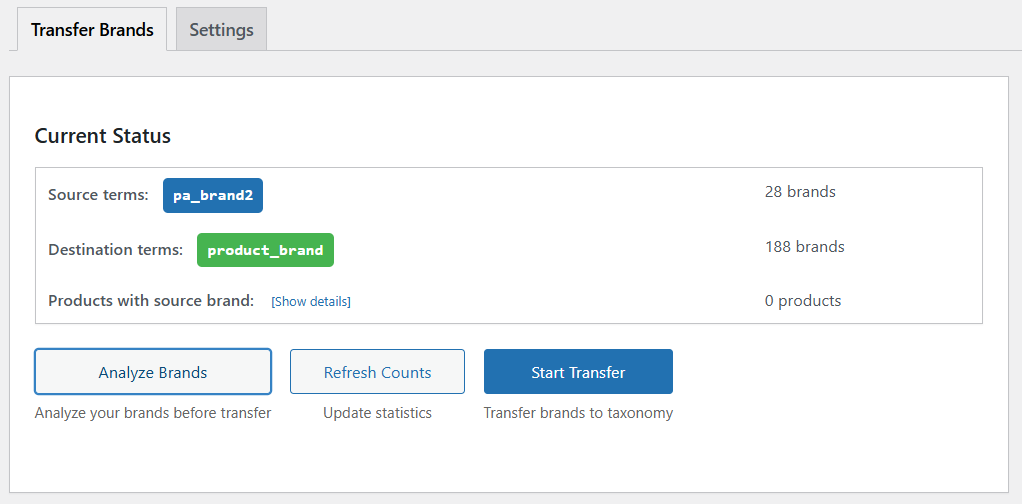
Use the Analyze tool to preview what will be migrated. Review brands and images before transfer.
Transfer with Backup
Click Transfer to migrate. A backup is created automatically. Rollback anytime if needed.
Migrate From Popular Brand Plugins
Transfer Brands supports migration from the most popular WooCommerce brand plugins to the native WooCommerce Brands taxonomy.
Perfect Brands for WooCommerce
Popular free brand management plugin with 90,000+ installations
pwb-brandYITH WooCommerce Brands Add-On
Feature-rich brand plugin from YITH
yith_product_brandWooCommerce Custom Attributes
Custom product attributes used as brands
pa_brandFeatures
- Safely migrate brand attributes to WooCommerce's native brand taxonomy
- Pre-transfer validation - ensures WooCommerce Brands is properly enabled
- Enhanced image support - preserves brand logos from 30+ popular themes
- SEO-friendly URL preservation - brand slugs maintained during transfer
- Batch processing for large catalogs
- Full backup before migration
- Analyze tool to check your brands before transferring
- Rollback capability if needed
- Support for both taxonomy and custom brand attributes
- Clean and intuitive interface with real-time progress
- Compatible with WooCommerce 9.6+ and the new Brands feature
- Works with HPOS (High-Performance Order Storage)
Frequently Asked Questions
What is WooCommerce native Brands taxonomy?
Starting with WooCommerce 9.6, WooCommerce includes a built-in Brands feature that provides a proper taxonomy for product brands. This offers dedicated archive pages, improved SEO, and better organization compared to custom attributes.
Will Transfer Brands delete my existing brand data?
No! The plugin is non-destructive by default. It copies your brand data to the new WooCommerce Brands taxonomy while keeping your original attributes intact. You can optionally delete the old data after verifying the transfer was successful.
Does the plugin transfer brand images and logos?
Yes! Transfer Brands automatically detects and transfers brand images from 30+ popular WooCommerce themes. It also supports images from plugins like Perfect Brands and YITH Brands Add-On.
What if something goes wrong during migration?
The plugin creates a complete backup before any transfer operation. If anything goes wrong, you can use the built-in rollback feature to restore your original data instantly. We also recommend creating a full site backup before major operations.
How do I enable WooCommerce Brands before migrating?
Go to WooCommerce → Settings → Products → Brands and enable the 'Brands' feature. Transfer Brands will validate that WooCommerce Brands is properly enabled before allowing you to start the migration process.
Ready to migrate your brands?
Download free from WordPress.org and migrate with confidence.
Download Now - It's Free